Chapter 10 External integration: OpenAPI
Chapter guide: Chapter 9 put "售后客服" ("After-sales Support") in human hands—support team on passwordless links, enterprise users on DingTalk bots; the last consumer type is programs. The platform’s own support console wants dialogue, streaming answers, and citation traceability on the same app; if the《商品 FAQ》("Product FAQ") corpus sources live in a self-built system instead of DingTalk sheets, content must be written into
after-sales-kbprogrammatically. This chapter clarifies the API system and auth—two doc sets, member-scoped API Key boundaries; three API families: chat API (OpenAI-compatible format, streaming events, interactive nodes), app log API, knowledge base API (collections and data); finally a runnable platform consumption chain—curl and fetch. After this chapter you can: use one API Key for streaming contextual chat on "售后客服" ("After-sales Support") and handle one form interaction.
Publish channels → API → New
Quota and expiry"] --> B["First chat verify (10.3)
curl chat/completions
Fixed chatId for context"] B --> C{"What platform consumes
(10.5)"} C -->|"Chat and tickets"| D["Gateway streaming (10.3 · 10.5)
fetch parse events
Interactive: same chatId resend"] C -->|"Sync product FAQ"| E["Push KB API (10.4)
pushData batch ≤ 200
searchTest spot-check then ship"] D --> F["Go-live reconcile (10.2 · 10.5)
getChartData source=api
→ MCP book Ch. 8"] E --> F
Chapter 10 flow overview
When you need it
Three typical situations map to three ways of using this chapter.
The platform must embed "售后客服" ("After-sales Support") in its own product—support console, ticket system, mobile app reusing Chapter 7 workflow without FastGPT UI—Section 10.1 key, 10.3 chat, 10.5 full chain. Main line of this chapter.
External content must land in the knowledge base programmatically—Chapter 5 API knowledge base is “FastGPT pull”; when the source cannot expose a spec, your cron pushes in—Section 10.4 collection and data APIs are the “push” path.
Billing, volume, errors—after channels and API open, how much the platform called, how many failures, points spent—Section 10.2 log APIs split by source; single bad chat → Section 10.3 record API for node-level detail.
Prerequisites: Chapter 7 workflow "售后客服" ("After-sales Support") published (publish itself Chapter 9); your account has permission on target app and knowledge base—API Key is member credential, not per-app key (Section 10.1).
10.1 API system and authentication
Two doc sets: Dev API and System OpenAPI
From v4.15.0, official API docs auto-generated via zod-openapi; legacy left-nav manual pages no longer updated—use generated docs. Two sets:
| Doc set | Scope | Callable with API Key | URL |
|---|---|---|---|
| Dev API | All in-development endpoints | Not always | {endpoint}/apidoc/devapi |
| System OpenAPI | All system-open endpoints | Yes | {endpoint}/apidoc/systemopenapi |
Cloud: {endpoint} = https://cloud.fastgpt.cn (mainland) or https://cloud.fastgpt.io (international); self-host = Chapter 2 deploy URL. This chapter’s endpoints from System OpenAPI material—confirm target is in that set before integration.
Get API Key: two entries and member scope
Two places: Account → “API keys”; App → Publish channels → “API access.” Latter has “New” to create.
Key change (source): Publish channels API entry shows the logged-in member’s API Key—team member credential for open API calls, no longer per-app dedicated keys. Boundary: key equals “this account in this team”—any permitted resource (apps, knowledge bases) can be operated—whoever gets the key gets your team identity. Official tips: quota or expiry against abuse; copy again from API list.
Account entry UI in testing—local community v4.17.3 (2026-11-03, glm-5.3-flash + embedding-3):
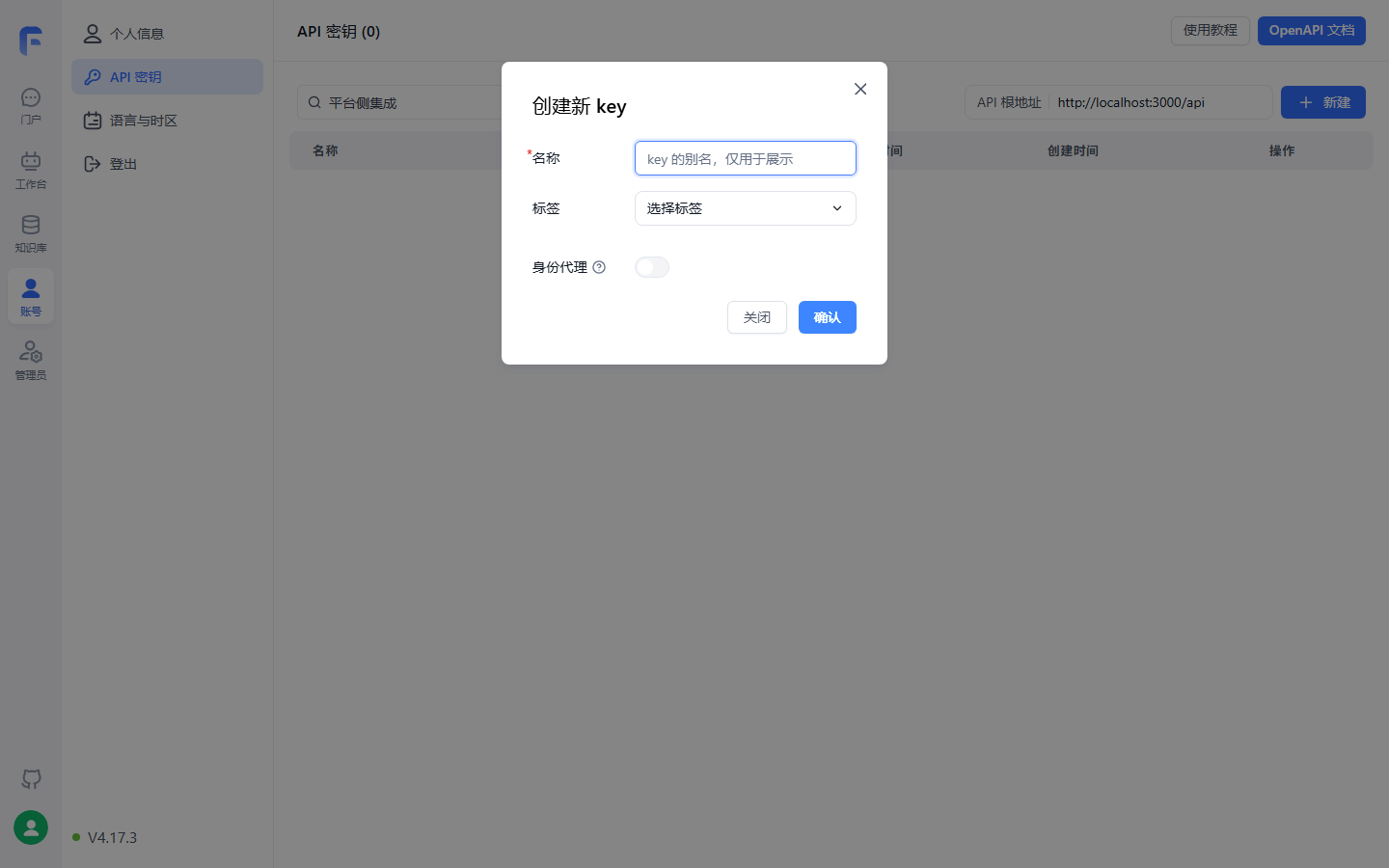
API root is above the key list (self-host = Ch. 2 URL); besides alias and tags, “Identity proxy” toggle—proxy config at end of this section.
Auth config and appId three-level priority
All OpenAPI via Header.Authorization, base two lines (source):
baseUrl: "http://localhost:3000/api"
headers: {
    Authorization: "Bearer {{apikey}}"
}
For chat/completions, pass appId in body; for OpenAI ecosystems, append to key: Authorization: Bearer <apiKey>-<appId>. Priority:
| Priority | appId source | Notes |
|---|---|---|
| 1 | Body body.appId |
Explicit, recommended |
| 2 | <apiKey>-<appId> in Authorization |
Third-party apps with one secret string |
| 3 | appId bound to API Key | Legacy |
Three IDs from UI: appId in app detail browser URL; datasetId and collectionId on KB/collection detail pages (source screenshots).
Platform note: authProxy to act for team members—gateway represents different members—team owner enables on key create/edit; proxy identity still needs app/session access (from FastGPT v4.15.0). Same shape as Chapter 9 MCP Server identity proxy—“who executes and who is billed.”
Boundaries and pitfalls
- SDK 404: some SDKs need
/v1on BaseURL—source says retry withv1; - Key is member-level, server config only—not front-end or Git (our recommendation);
- Dev API endpoints may not accept API Key—confirm in System OpenAPI first.
10.2 App management API: two log endpoints
Prerequisites: API Key and appId (global key OK). Two app log APIs (source):
| API | Method & path | Input | Output |
|---|---|---|---|
| App aggregate stats | GET /api/proApi/core/app/logs/getTotalData |
appId |
totalUsers, totalChats, totalPoints |
| App chart data | POST /api/proApi/core/app/logs/getChartData |
appId; dateStart/dateEnd; source array; offset; userTimespan/chatTimespan/appTimespan |
userData; chatData; appData |
Timespans day|week|month|quarter; source ten values: test, online, share, api, cronJob, team, feishu, official_account, wecom, mcp—Ch. 9 share and IM channels, this chapter OpenAPI, MCP Server meet here for split reconciliation.
Boundary: /proApi/ prefix—source does not tag community/commercial—no conclusion here, verify on your deploy (review checklist).
10.3 Chat API: one endpoint, four response shapes
Request parameters: five extensions
POST /api/v1/chat/completions is the OpenAPI centerpiece. Request matches OpenAI chat (messages, source); FastGPT adds five parameters—native and extended:
| Parameter | Description |
|---|---|
appId |
App ID, recommended in body (priority Section 10.1) |
chatId |
Session ID. Omit: no platform context, full messages history; non-empty: use session history, only last message in messages is the user turn, rest ignored. You ensure uniqueness, length < 250, often your UI session ID |
messages |
OpenAI chat format |
responseChatItemId |
Optional response message ID stored by platform; unique per chatId |
detail |
Return intermediates (node status, full results); in stream via events, in non-stream in responseData |
variables |
Module variable object replacing [key] in orchestration inputs |
Four quadrants: detail × stream
| Combo | Response | Typical use |
|---|---|---|
| detail=false, stream=false | OpenAI JSON: choices[0].message.content + usage |
Backend one-shot answer |
| detail=false, stream=true | SSE text: data lines choices[0].delta.content |
Typing UI |
| detail=true, stream=false | Above + responseData: per-node model, tokens, quoteList, completeMessages |
Server QA and trace |
| detail=true, stream=true | Event stream: status, answer, detail separated | Live progress, citations, telemetry |
curl base request (structure from source, content from running example):
curl --location --request POST 'http://localhost:3000/api/v1/chat/completions' \
  --header 'Authorization: Bearer fastgpt-xxxxxx' \
  --header 'Content-Type: application/json' \
  --data-raw '{
    "appId": "your_app_id",
    "chatId": "support-20261102-0001",
    "stream": false,
    "detail": false,
    "variables": { "uid": "u_10086" },
    "messages": [
      { "role": "user", "content": "运输破损怎么赔偿?" }
    ]
  }'
choices[0].message.content is the user-facing answer. usage carries prompt_tokens, completion_tokens, and total_tokens as a compatibility field; it does not stand for actual consumption. Later text already states the response does not return actual token usage—set detail=true and sum node tokens from responseData.
Streaming events: full event set
With stream=true, Server-Sent Events (SSE) text stream; each event has event and data lines. [DONE] ends the answer body; the parser must not exit there, because the later record has flowResponses arriving after [DONE]—close on the connection end. With detail=true, event separates progress, body, and detail. Full set per source:
| event | Meaning |
|---|---|
| answer | Text to client (counts as answer) |
| fastAnswer | Designated reply node text (counts as answer) |
| flowNodeStatus | Current node status |
| flowResponses | Full node response incl. citations |
| chatTitle | Title from user turn |
| toolCall / toolParams / toolResponse | Tool three-phase: call, params, return |
| updateVariables | Variable update |
| interactive | Interactive node config (below) |
| error | Error |
Example order (detail=true, stream=true): flowNodeStatus (KB search) → flowNodeStatus (AI chat) → answer chunks → [DONE] → flowResponses. For Ch. 7 workflow "售后客服" ("After-sales Support"), platform can show “searching knowledge base… querying ticket…”; toolResponse is HTTP ticket data; citations (Ch. 13 chunk reader) in flowResponses after answer completes.
Three OpenAI compatibility boundaries
model,temperature, etc. invalid—orchestration decides, not API; change prompt/model on canvas (Ch. 7);- Response does not return actual token usage; use detail=true and sum node tokens in
responseData; - “OpenAI compatible” means structure—SDK 404 add
/v1(Section 10.1).
Our recommendation: treat chat/completions as “trigger orchestration once,” not “call one model”—sampling params familiar from the OpenAI SDK are all ineffective here; behavior tuning is on the app canvas, not the caller.
Interactive nodes: pause and resume
Chapter 7 phone form is an interactive node. Workflow stops at interactive when detail=true: stream=true read event=interactive → data.interactive; stream=false from choices[].message.content elements with interactive. Caller gets display config with type and params only—userSelect (options) or userInput (inputForm); nested children/loop/tool wrappers return innermost user-facing node.
Resume same endpoint, two rules: userSelect → selected value as messages; form input → serialize “form key → user value” object string as messages. chatId must match the paused call—platform resumes workflow state.
Sessions and chat records: CRUD cheat sheet
Three IDs (source “important fields”): appId → app; chatId → session under app; dataId → one chat record under session.
| API | Method & path | Purpose & notes |
|---|---|---|
| List sessions | POST /api/core/chat/history/getHistories |
appId, offset, pageSize; source api = API-created only, not mixed with UI |
| Rename or pin | PUT /api/core/chat/history/updateHistory |
customTitle or top |
| Delete one session | DELETE /api/core/chat/history/delHistory |
query chatId + appId |
| Clear app sessions | DELETE /api/core/chat/history/clearHistories |
Only API Key sessions, not online/share/etc. |
| List chat records | POST /api/core/chat/record/getPaginationRecords |
Per session; loadCustomFeedbacks |
| Single run detail | GET /api/core/chat/record/getResData |
dataId → node-level detail |
| Delete record | DELETE /api/core/chat/record/delete |
contentId, chatId, appId |
| Like/dislike | POST /api/core/chat/feedback/updateUserFeedback |
userGoodFeedback or userBadFeedback; omit to cancel |
| Question guide | POST /api/core/ai/agent/v2/createQuestionGuide |
4.8.16+; appId + chatId, last 6 turns |
clearHistories scope: platform “logout deletes data” only hits API sessions—share-link user chats excluded (Ch. 9 localId).
Plugin app call differences
Plugin-type apps, same endpoint, four extra rules (source): default detail mode; no chatId—single round; no messages—variables are plugin input; output from responseData element moduleType=pluginOutput field pluginOutput, or stream event=flowResponses after deserialize. Running example workflow app not affected—listed for reference.
Boundaries and pitfalls
- detail=false → no citations or node detail—platform trace needs detail=true;
- Interactive without detail=true → no interactive event; resume without same chatId → new session;
- chatId > 250 or duplicate responseChatItemId are explicit constraints—define at session creation.
10.4 Knowledge base API: collections and data management
Three-layer overview
Chapter 3 layers map to API: Knowledge Base → Collection → Data (Chunk), plus searchTest from Chapter 4 tuning:
| Layer | Operations | Path prefix |
|---|---|---|
| Knowledge base | create, list, detail, delete | /api/core/dataset |
| Collection | create (six kinds), listV2, detail, update, delete | /api/core/dataset/collection |
| Data | pushData, list (v2), detail, update, delete | /api/core/dataset/data |
| Search test | searchTest | /api/core/dataset/searchTest |
Collection create: six entry types and shared params
| Method | Endpoint (POST) | Input | Notes |
|---|---|---|---|
| Empty collection or folder | …/collection/create |
name; type folder or virtual | Virtual for manual data |
| Plain text | …/collection/create/text |
text | Split incoming text |
| Web link | …/collection/create/link |
link; optional metadata.webPageSelector | Fetch then split |
| Local file | …/collection/create/localFile |
form-data file + data JSON | pdf, docx, md, txt, html, csv; encode Chinese filenames |
| API file | …/collection/create/apiCollection |
apiFileId | From API file library |
| External file | …/collection/create/externalFileUrl |
externalFileUrl etc. | Commercial |
Shared create params (excerpt, full table in source):
| Parameter | Description |
|---|---|
datasetId |
Knowledge base ID, required |
trainingType |
chunk or qa, required |
chunkSettingMode |
auto system default; custom manual |
chunkSize |
Default 1500 (ignored in auto) |
indexSize |
Default 512, must be < index model max tokens |
chunkSplitter |
Custom split delimiter, highest priority |
qaPrompt |
QA split prompt |
tags |
Collection tags (commercial): structured array, legacy string array (Ch. 5) |
customPdfParse |
Enhanced PDF parse, default false |
Response: collectionId and insertLen (chunks queued)—split/train async in queue; insertLen is enqueue count. chunk/index semantics Ch. 3–4; API exposes same knobs.
Data push and incremental update
POST /api/core/dataset/data/pushData, three hard rules: max 200 rows per call; billing auto-created, no billId; each row q required, a optional, indexes optional—default index from q+a.
Key fields (excerpt):
| Field | Description |
|---|---|
| q / a | Primary / auxiliary, q required |
| indexes | Vector index array, max 5 custom per row |
| indexes[].type | default, custom, summary, question, image; default custom |
| indexes[].dataId | Linked vector ID—on update incremental, not full rebuild |
| indexes[].text | Index text, required |
curl --location --request POST 'http://localhost:3000/api/core/dataset/data/pushData' \
  --header 'Authorization: Bearer fastgpt-xxxxxx' \
  --header 'Content-Type: application/json' \
  --data-raw '{
    "collectionId": "your_collection_id",
    "trainingType": "chunk",
    "data": [
      { "q": "问题主体文本", "a": "答案补充文本(可省略)" },
      { "q": "第二条数据", "indexes": [ { "text": "自定义索引文本" } ] }
    ]
  }'
Maintain: list (offset, pageSize max 30, collectionId, searchText), detail, update (dataId + new q, a, indexes; dataId on index item = incremental, without = new), delete by data ID. Ch. 4 retrieval uses indexes not raw text—whether update auto-rebuilds indexes with q, source silent—verify hands-on (review checklist).
searchTest: Chapter 4 in code
POST /api/core/dataset/searchTest = UI “search test” API equivalent:
| Parameter | Description |
|---|---|
| datasetId & text | KB and query text |
| limit | Max tokens, cap 20000 |
| similarity | Min relevance 0~1, optional |
| searchMode | embedding, fullTextRecall, mixedRecall (Ch. 4) |
| usingReRank | Use rerank |
| datasetSearchUsingExtensionQuery trio | Query optimization switches, model, background |
Response: top-k with q, a, datasetId, collectionId, sourceName, sourceId, score. Our recommendation: tune in UI (Ch. 4), regress in code—copy tuned params into searchTest, assert target chunk in top-k after each KB change—raw material for Ch. 13 evaluation.
Boundaries and pitfalls
- Collection params interact: chunkSettingMode=auto → chunkSize, indexSize, chunkSplitter, qaPrompt ignored—per source, don’t tune in vain;
- pushData 200 cap hard—《商品 FAQ》~200 rows fits one batch; two batches safer;
- Delete APIs (KB, collectionIds, single data) no second confirm in source—add “disable then delete” in your jobs;
- tags structured array and listV2 tagFilters commercial—community uses legacy string array (Ch. 5).
10.5 Hands-on: platform consumption chain for After-sales Support
Overview: gateway holds Key
Platform consumption roles and flow:
Bearer Key + appId + stream F->>W: Run orchestration (classify → search → tickets) W-->>F: flowNodeStatus and answer events F-->>G: SSE stream passthrough G-->>U: Render answer, citations, ticket status Note over U,F: Interactive—event=interactive
Form resend with same chatId
One line: API Key only on platform gateway, workbench front-end never holds it—Section 10.1 member boundary in topology. Workflow HTTP calls mid-platform GET /api/after-sale/tickets?phone={phone} (Ch. 7); platform sees return via toolResponse.
Chat calls: curl and fetch
curl is Section 10.3 base; gateway fetch (Node.js, book example—no JS in source, standard SSE parse, not verified hands-on):
// Platform gateway — POST /api/v1/chat/completions (Node 18+)
const res = await fetch("http://localhost:3000/api/v1/chat/completions", {
  method: "POST",
  headers: {
    Authorization: `Bearer ${process.env.FASTGPT_API_KEY}`,
    "Content-Type": "application/json"
  },
  body: JSON.stringify({
    appId: process.env.FASTGPT_APP_ID,      // After-sales Support app
    chatId: platformSessionId,              // Reuse platform session ID
    stream: true,
    detail: true,
    variables: { uid: platformUserId },
    messages: [{ role: "user", content: userText }]
  })
});

const reader = res.body.getReader(), decoder = new TextDecoder();
let buffer = "";
for (;;) {
  const { done, value } = await reader.read();
  if (done) break;
  buffer += decoder.decode(value, { stream: true });
  const lines = buffer.split("\n");
  buffer = lines.pop();
  for (const line of lines) {
    if (!line.startsWith("data:")) continue;   // dispatch event lines separately
    const payload = line.slice(5).trim();
    if (payload === "[DONE]") continue;
    const text = JSON.parse(payload).choices?.[0]?.delta?.content;
    if (text) pushToWorkbench(platformSessionId, text);   // stream to UI
  }
}
Three implementation notes. Line buffer—TCP may split event/data; partial lines carry over; dispatch event lines for flowNodeStatus, interactive form UI, flowResponses citations; on interactive pause stream, user submits, same chatId resend—serialize form string (example: Ch. 7 form key phone):
curl --location --request POST 'http://localhost:3000/api/v1/chat/completions' \
  --header 'Authorization: Bearer fastgpt-xxxxxx' \
  --header 'Content-Type: application/json' \
  --data-raw '{
    "appId": "your_app_id",
    "chatId": "support-20261102-0001",
    "stream": true,
    "detail": true,
    "messages": [
      { "role": "user", "content": "{\"phone\":\"13800000000\"}" }
    ]
  }'
Weekly push for Product FAQ
Chapter 5 alternate path: API KB is “pull,” this section is “platform push”—when FAQ source is self-built without a spec API. Weekly cron three steps:
| Step | Action | Basis |
|---|---|---|
| 1 Fetch | Pull this week’s FAQ (~200 rows) from product system | Running example convention |
| 2 Write | Changed rows PUT data/update with dataId incremental; new pushData (batch ≤ 200); retired DELETE data/delete | 10.4 |
| 3 Ship | searchTest three representative queries, confirm recall | 10.4 & Ch. 4 |
Example pipeline is book design (source gives endpoints only, not orchestration), not verified hands-on, review checklist; when FAQ lives in DingTalk AI sheet, Ch. 5 third-party sync still preferred—push is fallback.
Post go-live reconciliation
- Volume and errors: getChartData
source: ["api"], chatCount, errorCount, points (10.2); - Drill-down: bad session → getResData by chatId/dataId to node (10.3);
- Heavier observability—SignOz and call logs—Chapter 11 (→ langfuse book).
OpenAPI vs MCP Server
| Route | Interaction | Fit |
|---|---|---|
| OpenAPI (this chapter) | Chat-as-a-service: platform owns session, UI, UX | Embed in own console, multi-turn, streaming UI |
| MCP Server (Ch. 9) | App-as-tool: platform Agent calls by tool protocol | Agent treats "售后客服" ("After-sales Support") as one tool in a larger plan |
Same app both ways: console OpenAPI for dialogue UX, platform Agent MCP for tool use—consumer full chain (→ MCP book Ch. 8) meets in after-sales domain.
Boundaries and pitfalls
variablesuid etc. are business vars, not auth—auth is Bearer Key and (if on) authProxy;- Source example: flowResponses may arrive after
data: [DONE]—do not close parser on[DONE]alone, use connection end; - Interactive form keys from
inputFormin interactive payload, not hard-coded—orchestration key change breaks client; - Clear/delete APIs scope API-origin only—do not use to wipe share-link user chats.
Chapter summary
- API Key is member credential, not app secret: two entries; quota/expiry abuse gates; appId three priorities; SDK 404 add
/v1. - chat/completions four shapes: detail×stream for one-shot, typing, QA trace, live progress; chatId drives platform vs self-managed history.
- OpenAI compatibility three boundaries: model/temperature ineffective, tokens not returned, structure not params—tune on canvas.
- Stream protocol: answer/flowNodeStatus body and progress, toolResponse tickets, interactive pause–render–same chatId loop.
- KB API three-layer CRUD + searchTest: six collection entry types, shared chunk params; pushData 200 cap, dataId incremental; searchTest carries Ch. 4 params into code regression.
- Platform chain: gateway holds key, fetch line-buffer SSE, weekly FAQ three steps; reconcile source=api; OpenAPI vs MCP “chat vs tool” (→ MCP book Ch. 8).
Next: programmatic consumption works and traffic and billing grow—Chapter 11 covers production config, object storage, sandbox, SignOz observability, and upgrade migration; dialogue quality labeling and patrol in Chapter 13.
Acceptance checklist
By now you should be able to:
- ☐ New API Key on publish channels with quota/expiry, curl first question on "售后客服" ("After-sales Support");
- ☐ State appId three priorities and
<apiKey>-<appId>in OpenAI-style client; - ☐ Fixed chatId two turns then new chatId isolation;
- ☐ detail=true stream=true, count events flowNodeStatus, answer, flowResponses order;
- ☐ Handle interactive: read inputForm from event=interactive, serialize form, same chatId, final answer;
- ☐ pushData two rows one with custom index, confirm in UI list;
- ☐ getChartData source=api for last day volume, errors, points.
Review checklist (before publish)
None verified hands-on; verify before publish:
- [ ] Endpoints vs official v4.17.3 (openapi intro/app/chat/dataset, publish/openapi), verified 2026-11-01;
- [ ] Chat API four quadrants, event set per actual returns (source: version variance); fetch example book-only, line buffer and [DONE];
- [ ] Interactive: type/params, same chatId resume, deepest interactive rule;
- [ ] pushData 200 cap, insertLen, dataId incremental, data/update index rebuild default (source silent), full FAQ push (book design incl. delete retired);
- [ ] Collection tags structured + listV2 tagFilters commercial; community behavior;
- [ ] App log
/proApi/availability and shape—source untagged, no conclusion; - [ ] searchTest limit 20000 tokens, three searchModes vs Ch. 4 UI;
- [ ] Chapter opener and Section 10.5 sequence diagram GitHub render.
Further reading
- (→ MCP book Chapter 8)—Platform Agent MCP consumption meets OpenAPI chat-as-a-service in after-sales domain; division Table 10.5.
- Chapter 9 (Publishing apps and channels)—MCP Server publish side; share link localId explains clear API scope.
- Chapter 4 (Retrieval plans and tuning)—searchTest searchModes and rerank; tune UI first, code regression second.
- Chapter 5 (Advanced knowledge bases)—API KB pull vs pushData push; collection tags commercial in Ch. 5.