Chapter 4 Team budgets and rate limits
If OD-2049's third chase becomes a retry loop, Seashore Select's support will empty the shared quota before the vendor has an alert. Budget and rate limit are two different doors on the gateway: one counts money, one counts attempts. This chapter first reads Usage and Request Logs after the demo has run, then slams both doors with deliberately tiny numbers, and records a case where the amount in the error text did not match the amount in the database.
and budget_duration"] --> B["The key sets
a smaller cap"] B --> C["The first request
is allowed and priced"] C --> D{"Which door does
the second hit"} D -->|"money"| E["422
budget_exceeded"] D -->|"count"| F["429
throttling_error"] E --> G["Reconcile from /key/info
not from Current cost in the error text"] F --> G
Procedure for this chapter
The UI rounds spend down to zero
The key table in chapter 3 shows alice's and bob's Spend as $0.0001. The Spend card on the Usage page is coarser still: it is $0.00. A single call, worked by hand, is $0.000062. The three precisions differ. Take $0.000062 from the response header and from the successful log row as the price of that call. Do not take the 0 on the card as "no money was spent".
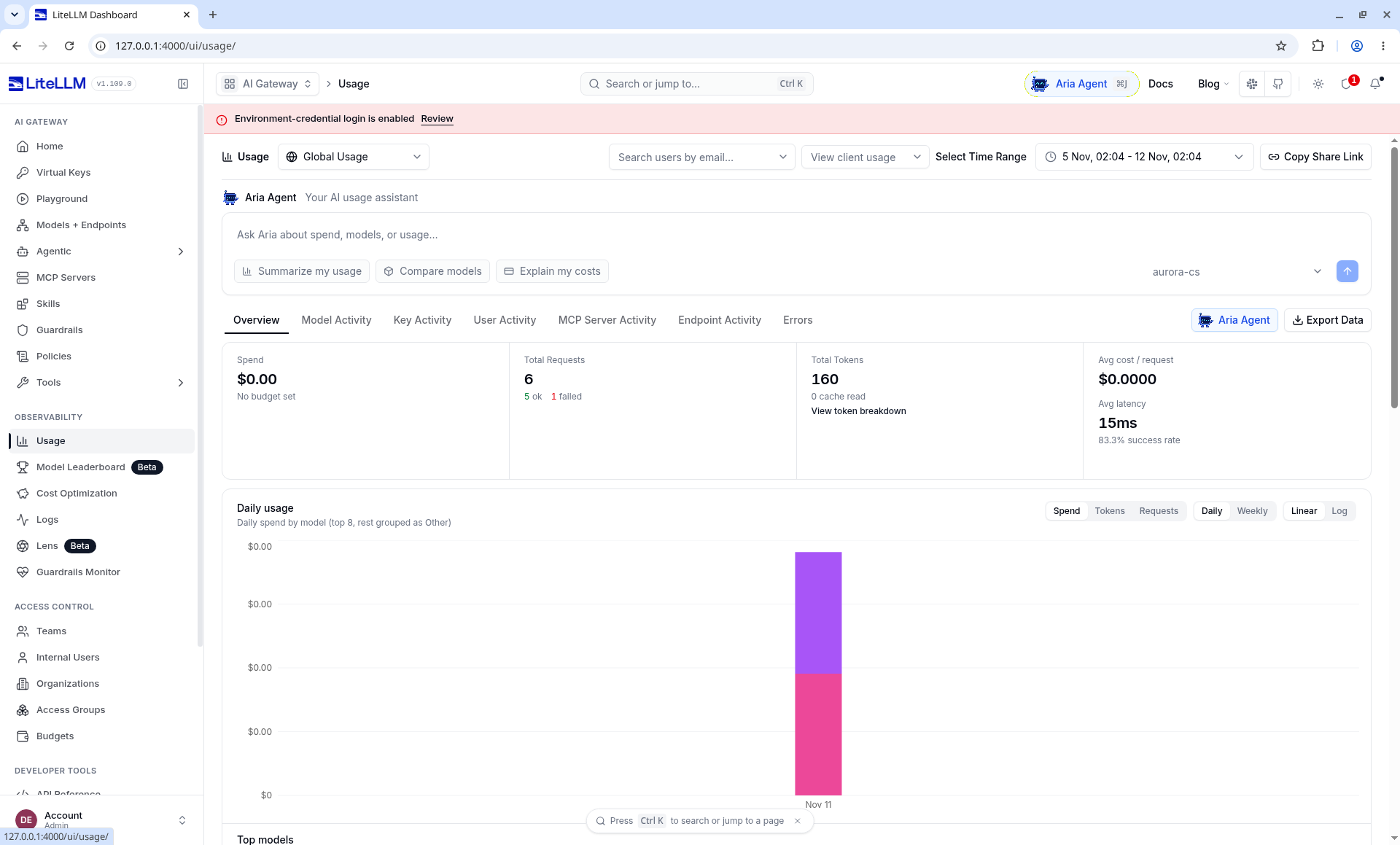
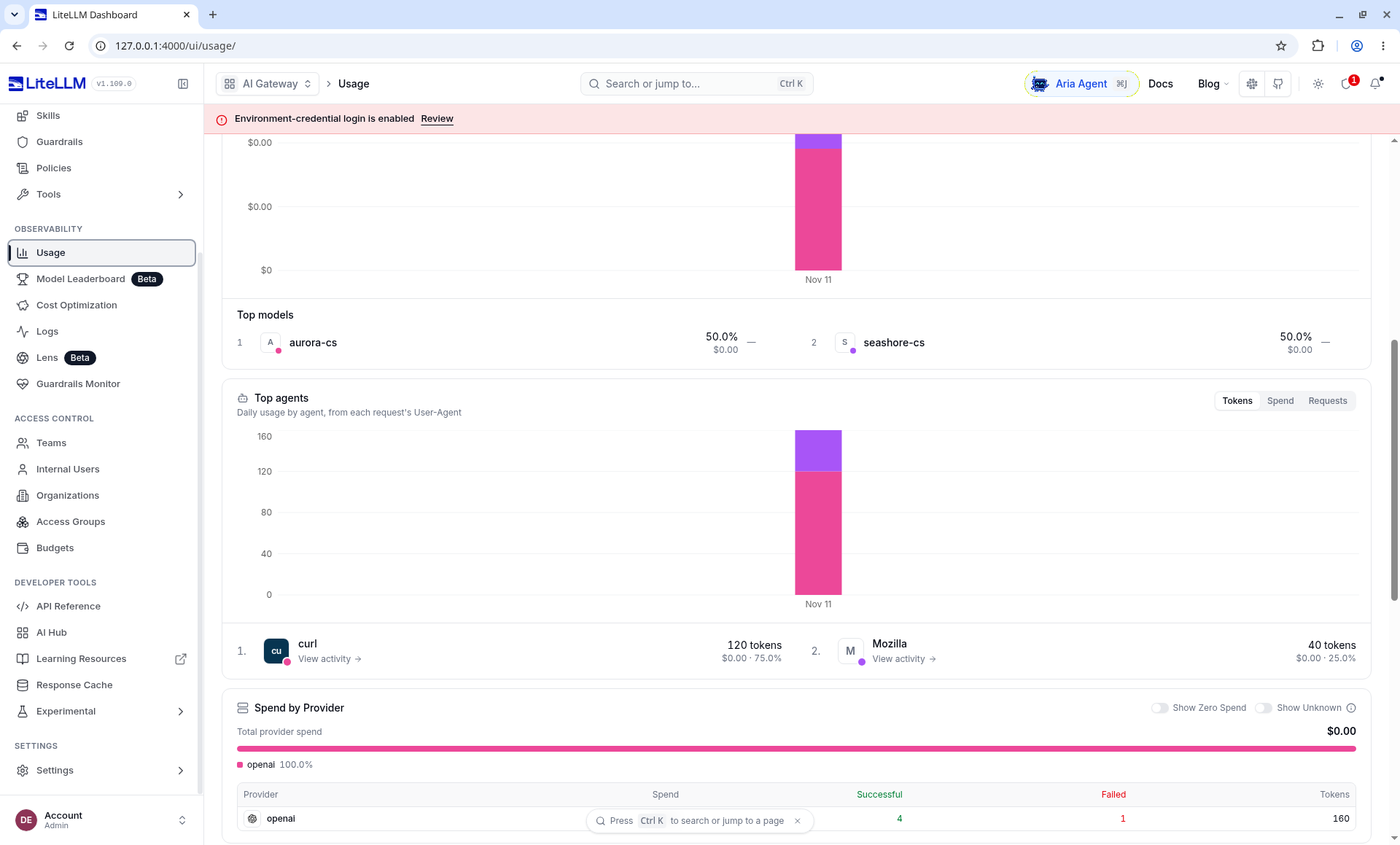
Read them next to Home. The two screenshots are not the same moment:
| Page | Requests | Tokens | Success rate | Spend |
|---|---|---|---|---|
| Home (chapter 2) | 4, 3 ok, 1 failed | 120 | 75.0%, latency 12ms | $0.00, No budget set |
| Upper half of Usage | 6, 5 ok, 1 failed | 160 | 83.33%, latency 15ms | $0.00, No budget set |
| Usage's Provider row | Successful 4, Failed 1 | 160 | This row does not add up to 6 | $0.00 |
The 6 requests in the upper half, and the Provider row's 4 successes plus 1 failure, sit side by side on the same Usage page and were not collapsed into one number. This book does not add an explanation of the form "one more call was not drawn". Top models shows the two aliases at half each, $0.00 each. Top agents' 120 plus 40 equals 160: curl 75%, Mozilla 25%. Mozilla's 40 tokens are the same size as one Playground turn of 18+22. The 120 tokens on curl are the size of three 40-token calls. These are numbers on the page that add up. They are not a row-by-row list.
Provider is written as openai because the model strings in the config start with openai/. The mock upstream never left this machine.
No budget set is written under the global Spend. Team budgets are on the Teams page in chapter 5: Seashore $50, Aurora $30. They are not shown on this global card.
Request Logs had only three rows
Logs → Request Logs, Last 24 Hours, listed 3 rows at the time. Live Tail was on.
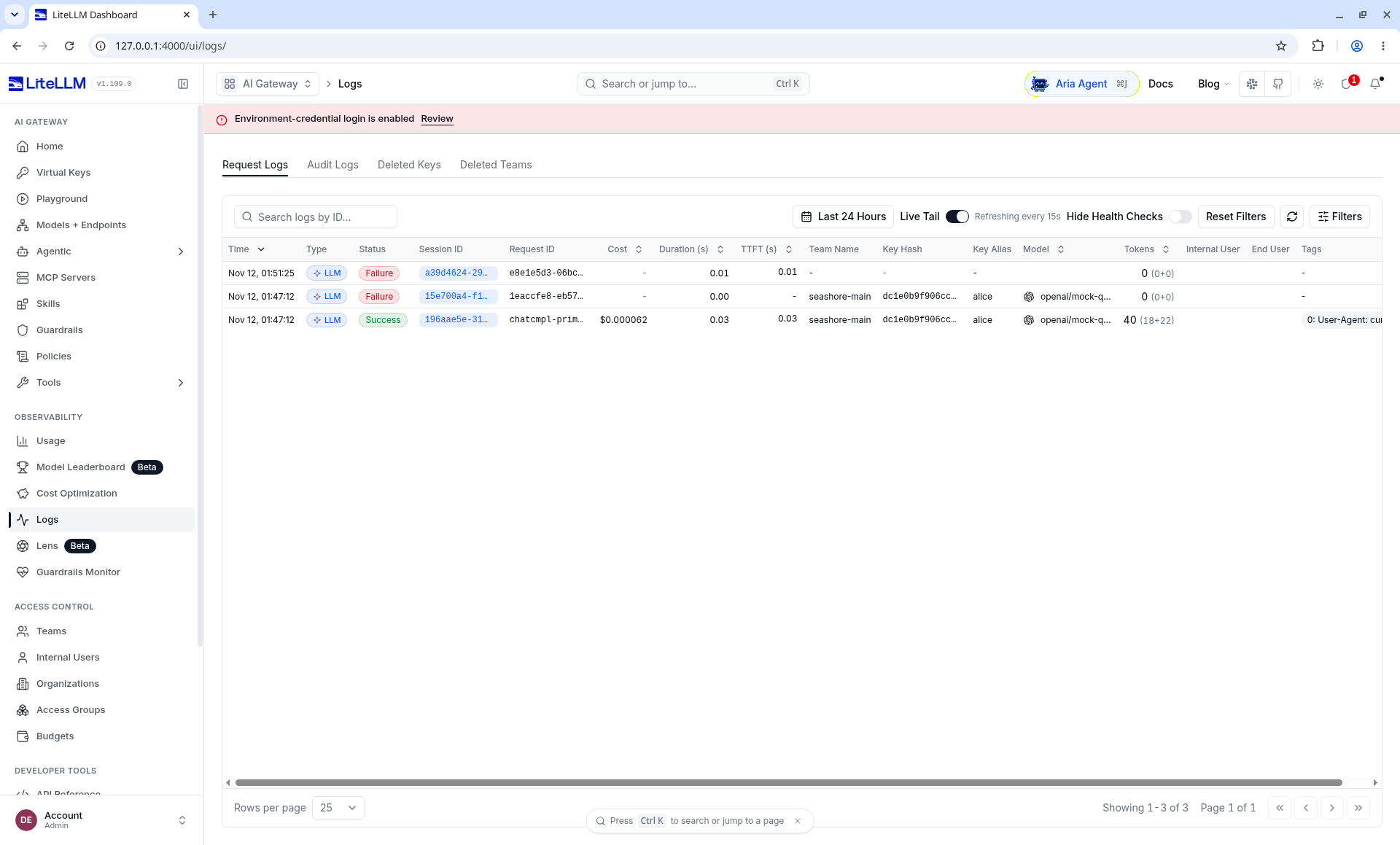
By the record of this run, the three rows are: one unauthenticated /health failure, alice's 403, and one success by alice. The success row's cost of $0.000062, 40 tokens (18+22), team seashore-main, and key alias alice line up with alice's call to seashore-cs. The list itself does not print the path /health in a visible column. The unauthenticated row is identified from the notes taken at the time, not from a cell you can point at in the picture.
bob's HTTP 200, and the later Playground success, were not in this list. Usage afterwards showed more requests. So this Request Logs view is not a row-by-row breakdown of Usage. Someone on call who only pages through these three rows will miss bob and the question asked in the browser. Do not rewrite the gap as "the logs and the usage match exactly", and do not edit the picture to close it.
The model column on the success row is likewise truncated around openai/mock-q. It cannot tell seashore-cs from aurora-cs. In this config both aliases' upstream model string is openai/mock-qwen-plus. Read the alias from the key and the team. Read the deployment from the response header.
The team takes a slice first
The team budgets in the screenshots are Seashore $50 and Aurora $30, and the keys are alice $10 and bob $8. Those are the numbers seeded into the UI on the 12th. They are far too large to be hit by two calls of $0.000062. The experiment below, on 2026-11-11, used different numbers: the Seashore team max_budget was 1.0 dollars, and Aurora's was 0.5 dollars. The key used to hit the door was smaller still. Do not match the $50 on the Teams page against the 422.
At /team/new, Seashore Select's max_budget is 1.0 dollars, budget_duration is 1d, rpm_limit is 30, and tpm_limit is 20000. Aurora is 0.5 dollars and rpm_limit 20, with no tpm_limit.
budget_duration values listed on the Team Budgets page include 1s, 1m, 1h, 1d, and 30d, meaning reset every second, minute, hour, day, and month. The example on the page sets max_budget to a tiny decimal to trigger a refusal. This machine uses the same method. It is not Xingfan's pricing.
In this experiment, 1d resets at the next UTC midnight (2026-11-12T00:00:00Z), not "24 hours from now". Only one pair of create time and budget_reset_at was observed. Do not write that every version aligns to a calendar day. When you change versions, compare these two fields.
A key can set a still smaller max_budget and rpm_limit. The support process receives the key. The team cap is the sum of this key and the other keys on the same team. This machine did not run two keys concurrently on the same team to prove the word "sum". The docs' team-spend API returned a nested team_info.spend. After several calls, that field on the Seashore team is 6.2e-05, matching the single response header x-litellm-response-cost: 6.2e-05. Aurora's very small budget key later posted on its own, also 6.2e-05, recorded on the key. Do not read it mixed with Seashore's team spend.
The unit price is an experiment value
In config.yaml, the unit price of seashore-cs is 0.000001 dollars per input token and 0.000002 per output token. The mock upstream always returns 18 and 22. The formula:
18 * 0.000001 + 22 * 0.000002 = 0.000062
The response header x-litellm-response-cost: 6.2e-05 matches the formula. The unit price of seashore-cs-fast is input 0.0000004 and output 0.0000008. The same token counts are 0.0000248. The response header on the successful fallback was 2.48e-05. The custom unit price took effect.
The startup log said: when a model is not in the built-in price table, the cached-token unit price defaults to 0, and input and output are unaffected. We had no cache field. That matches. Do not keep this set of unit prices into production. In production, either use LiteLLM's built-in model price table or write the contract price into model_info, and check the response header after one call with a known token count.
1e-9 dollars stops the second call
Aurora's key has max_budget set to 0.000000001. The first model=aurora-cs returns 200. The body is still the primary simulator's OD-2049 sentence. The spend check happens before the call: spend was 0 then, the request was allowed, and the charge was posted after the call. So "the budget is already smaller than the price of one call" does not stop the first call. It stops the second.
The second is HTTP 422:
{
  "error": {
    "message": "Budget has been exceeded! Key=… Current cost: 0.032777001, Max budget: 1e-09",
    "type": "budget_exceeded",
    "param": null,
    "code": "422"
  }
}
The key identifier in the message is a long hex string, not the sk- plaintext. This book does not copy that string. Current cost is written as 0.032777001. A few seconds later, spend in /key/info is 6.2e-05, and max_budget is still 1e-09.
Both numbers are above the cap, so the refusal itself holds. The two numbers are not equal to each other, so the error text cannot be used for reconciliation. Possible sources include: estimating the next call used another default price, or current cost in the text is not the posted spend. This machine did not trace it to a source line and does not pick one explanation and freeze it. Reconciliation looks only at spend in /key/info and the response header x-litellm-response-cost.
model_spend is still an empty object when spend is already non-zero. Do not use it for a dashboard unless you see it filled in on your own version.
The Team Budgets page says you can set litellm_settings.budget_exceeded_status_code to 429. The default is not 429. This machine did not change that, and what it observed is 422. If business code treats every 429 as "wait one second and try again", it retries a spent budget into a loop. A spent budget should stop, and tell a person to change the quota or the model, not call again. The 429 from rate limiting is the one that fits a short backoff. The two status codes have to be handled apart.
The key that allows one request per minute
Another key was issued on the Seashore team, rpm_limit 1, max_budget 1, model only seashore-cs. Three calls in a row:
| Order | HTTP | type | Response headers |
|---|---|---|---|
| 1 | 200 | A normal completion, hitting seashore-cs-primary |
x-litellm-attempted-fallbacks: 0, cost 6.2e-05 |
| 2 | 429 | throttling_error |
x-litellm-response-cost: 0, still with x-litellm-model-id: seashore-cs-primary |
| 3 | 429 | same as above | The reset time is the same as the second call |
The message says, in substance: this api_key's request limit is reached, current limit 1, remaining 0, and it gives a UTC reset time (this time, the end of the same one-minute window). The key in the message is again a hash, not the plaintext.
The model id in the 429 response headers is still primary. The request was rate-limited before it reached the upstream. The id does not mean the upstream already ran. Cost 0 agrees with that. A client must not read "there is a model id" as "a conversation was already produced".
tpm_limit was not filled on its own on this machine. The Seashore key was set to 4000, and one call is only 40 tokens, which cannot fill it. The docs place tpm next to rpm on the key, the user, and the team. Before production, use one known large max_tokens to push tpm into a 429, and confirm the type is still throttling_error and that the business separates it from budget_exceeded.
Posting is delayed
Right after the Seashore key's first call, /key/info shows spend 0 and total_spend 0. About two seconds later both are 6.2e-05. The team's team_info.spend is the same number.
If a dashboard refreshes every second, spend arrives late. If an alert reads the database in the same millisecond as "the response has returned", it misses the call that just happened. The budget block, though, can see some spend number on the next request: Aurora's second call returned 422 without us refreshing by hand. So "what the info API makes visible" and "what the next request decides" are not the same cache. The runbook should say it as two sentences: wait two seconds before reading info for reconciliation; whether blocking works is verified by the next request, not by refreshing the page.
Multiple replicas and Redis
fail_closed_rate_limit_enforcement in config_settings defaults to false. When set to true, a failed Redis check of tpm, rpm, or max_parallel_requests returns 503 instead of falling back to the in-process counter. When it falls back to the in-process counter by default, N replicas can allow up to N times the limit. Without Redis, this setting does nothing.
This machine is one process, with no Redis, and the rpm 429 is real. If Xingfan scales what sits behind llm.example.com to several Proxy replicas and does not configure Redis, 30 per minute becomes 30 times the replica count per minute. This is not a corner of the docs. It is the default behavior of multiple replicas. Write Redis and rate limits together in the scale-out design. This book did not start a second proxy process and did not verify the 503 fail-closed path.
max_parallel_requests can sit on a deployment or globally. Both are null on this machine. Concurrency was not filled. If a support streaming response holds a connection, the parallel cap becomes a problem earlier than rpm. Not tested, so no procedure is written.
Soft limits and a temporary budget increase
soft_budget in the response body is null, and soft_budget_cooldown is false. The enterprise page lists "email alert before the hard limit" as a licensed capability. The open-source team API lets you pass a soft_budget field. This machine did not pass it and does not know whether an alert is sent when no license is set. Do not write "at 80% an email is sent" in the runbook unless you have already received one.
/key/update can change max_budget. The docs also say a temporary budget increase needs an admin, and there is self_serve_budget_policy so the key's owner can change it within a range. The owner is defined as a user_id that equals both the key's user_id and created_by. The support key in chapter 3 has user_id null, so there is no owner self-serve. Raising the budget is an admin job, using the master key or a separate admin key. Do not build this capability into Xiaofan.
Relation to the vendor's limit
The gateway budget uses the unit price you wrote, not the vendor invoice. The vendor's own monthly cap, free tier, and unpaid balance still come back as their errors. AllocationQuota.FreeTierOnly in the AgentScope verification notes is that kind of error. The gateway can choose to treat it as a failure that may fall back (chapter 7). It cannot "budget it away" inside the price table.
Both ledgers are required:
| Ledger | Who records it | What Xingfan uses it for |
|---|---|---|
| Gateway spend | LiteLLM, at the configured unit price | Stop a runaway retry, and split Seashore from Aurora |
| Vendor invoice | The vendor | Finance reconciliation. A gap versus gateway spend is normal. If the gap is absurd, then check the price table |
One source of an absurd gap is 0.032777001 in this section's error text versus the posted 6.2e-05. If someone imports the error log as an invoice, Seashore's daily budget is filled by a fake number. When collecting logs, drop the Current cost half of the sentence. Keep type and the HTTP status.
Status-code comparison
The same "second request" goes through different doors depending on the kind of number. The rows this machine saw are placed next to the ones the docs mention but this machine did not reconfigure, so the business does not retry everything from one catch (Exception).
| Condition | HTTP | type | On this machine |
|---|---|---|---|
Key spend already over max_budget |
422 | budget_exceeded |
Seen. Aurora's second call |
Same, but budget_exceeded_status_code: 429 is configured |
The docs say it becomes 429 | Config not changed, not seen | |
| rpm window used up | 429 | throttling_error |
Seen. The second and third calls of rpm_limit: 1 |
| Model name not on the key's list | 403 | key_model_access_denied |
Seen. This is isolation, not budget |
| Model name does not exist | 400 | invalid_request_error |
Seen |
| No key | 401 | auth_error |
Seen |
| Key is not in the database | 401 | token_not_found_in_db |
Seen |
| Rate limit cannot be checked on Redis and fail-closed is on | 503 | Described in the docs | Redis not configured |
A 422 response may still carry x-litellm-model-id. The 429 carried seashore-cs-primary, cost 0. When writing a parser: model id present, cost 0, and status 429 means the upstream was not called.
Windows and reset
The rpm message gives a reset time, precision to the second, timezone written as UTC. The third call's reset time matches the second, so the window was not pushed later by another refusal. If the client busy-retries before the reset time, it only gets more 429s. Backoff has to cross that time, with jitter, so everything does not wake up together on the minute.
The budget's budget_reset_at is a different clock. The rpm window is on the order of a minute. The budget reset in this experiment is the next day's UTC midnight. Support can recover by sleeping one minute after a 429. Sleeping one minute after a 422 does not recover. Writing both kinds of "wait a bit" as the same retry decorator is the bug chapter 4 exists to remove.
With tpm_limit: 4000 and a 40-token call, in theory many calls in a row are needed to hit it, and rpm arrives first in the middle. To accept tpm on its own, set rpm very high or leave it empty, set a single max_tokens large, or set tpm to 10. This machine did not. Leave a blank row in the acceptance record. Do not copy the rpm 429 message and treat it as the tpm message. That rpm message said Limit type: requests. tpm should show the word token. Do not freeze the wording before you have seen it.
Which speaks first, the team cap or the key cap
The docs' structure is that both layers are checked. This machine did not build a sample of "the key has a lot left, the team is already used up", and it did not build the opposite of "the team is large, the key is small" beyond the case it has. The small-key case is Aurora's 1e-9: the team cap is 0.5, and the key is exhausted first. So we can only say "the key cap takes effect". We cannot say "the team cap was observed taking effect on its own".
How to add that sample: set the team max_budget to 0.000000001, the key max_budget to 10, send the second call, and see whether the error text names the team or the key. This machine's 422 text named Key=. If the team is exhausted first, the text may differ. It was not seen, so it is not invented.
The shape of /team/info is team_id, team_info, keys, team_memberships. spend is inside team_info, not on the outer object. If a collector reads the outer spend, it gets empty and then falsely reports "the team has no spend". This machine has no such key on the outside. The inside has 6.2e-05.
Matching one call to three numbers
Around 15:49 UTC on 2026-11-11, the Seashore key made one seashore-cs call. The three numbers have to match. If they do not, stop in this chapter. Do not go to production.
| Source | Number | Meaning |
|---|---|---|
| By hand | 18 × 0.000001 + 22 × 0.000002 = 0.000062 | Configured unit price times the simulator's fixed usage |
Response header x-litellm-response-cost |
6.2e-05 |
The price of this call |
/key/info spend about two seconds later |
6.2e-05 |
Posted |
| info read immediately at the same moment | 0 |
Not posted yet |
Aurora's second-call error text Current cost |
0.032777001 |
Cannot be the ledger |
Aurora key's later spend |
6.2e-05 |
Matches the primary unit price |
The reconciliation job compares only the first three rows. The fourth row reminds the collector to wait. If the fifth row is taken as a metric by a log platform, a 0.01-dollar cap would look more than three times over after a single call (0.032777 / 0.01 ≈ 3.3). The sixth row says Aurora's call was finally posted at the configured unit price. The large number in the refusal text was not written into spend.
model_spend is still an empty object. Do not chart it. Team spend is read from team_info.spend. After these calls, Seashore's team on this machine is 6.2e-05. That includes the Seashore key's call and does not include Aurora's key. Aurora is another team_id. The collector filters by team_id. Do not add every key's spend and then compare it with one team, unless you are sure nothing is missing and nothing is double-counted.
How to test a budget without dirtying the daily cap
The experiment set Aurora's key to 1e-9 and Seashore's team to 1 dollar. Production acceptance must not drive a merchant's real key to 422, or that day's real support is refused together. The method:
- Issue another key with
key_aliasseashore-budget-probe,max_budget1e-9,modelsonlyseashore-cs, andteam_idof a dedicated probe team, notseashore-main. Exhausting the probe team's budget does not block alice's support. To create fewer teams, this machine put the tiny budget on Aurora's key. Aurora's team cap is still 0.5. That is acceptable on an empty database. It is not acceptable on a database with real traffic. - The first call must be 200. If the first call is already 422, the check happened before the call and historical spend is already dirty. Use a new key.
- The second call must be 422,
typebudget_exceeded. - Revoke the probe key. This machine did not call the delete API. The empty database is discarded with the experiment machine.
- Keep the probe's order id as OD-2049, so the test data does not invent a second order. The body is a fixed return from the simulator and is not written into a real ticket.
The rpm probe also uses a separate key, rpm_limit 1. This key's alias on this machine is seashore-rpm-1, but the team is seashore-main. Its 429 does not affect the budget, but it occupies the team's rpm of 30. An empty database does not mind. In production, put the rpm probe in the probe team too, and point the probe team's models at a test alias, not at the production deployment of seashore-cs, so probe traffic does not hit the vendor.
When the price table is 0, the budget is not a safety net
Chapter 1 mentioned that a zero-price model skips the budget in the docs, unless the fallback pre-check stops it again. The experiment unit price is deliberately not 0, so 422 can appear. If someone leaves the production unit price empty, and the built-in price table also lacks this model, spend may stay 0 and the budget never fires. The startup log warns that the cache price is 0 for "not in the price table, but a custom unit price was written". What happens for "no unit price written at all" was not tried on this machine. Add one line to the go-live list: for one call with a known token count, the response-header cost must be non-zero, unless this contract really is 0.
Before leaving this chapter
- State the different business actions for 422
budget_exceededand 429throttling_error: the first stops and finds a person, the second takes a short backoff. - Check
x-litellm-response-costagainst the hand-calculated unit price on one call with a known token count. If they do not match, change the unit price first. Do not change the business retry first. - When reading
/key/info, wait for the posting. Do not conclude in the same millisecond the response returns. - Decide on Redis before multiple replicas. Until that decision, do not write rpm as a platform-level promise.
- The reset time of
budget_durationis the returnedbudget_reset_at. Compare it with whether your finance team's "one day" is UTC midnight.
Read next
- Chapter 5 tightens a team from "one budget bucket" into "one merchant".
- Chapter 7 meets a fallback skipped by the budget pre-check. The amount in that error text disagreeing with this chapter is the same kind of thing: a pre-check number is not the ledger.
- Langfuse book chapter 5 is cost inside a trace. The two sets of numbers come from different unit prices. Do not merge them into one chart without labeling the source.